


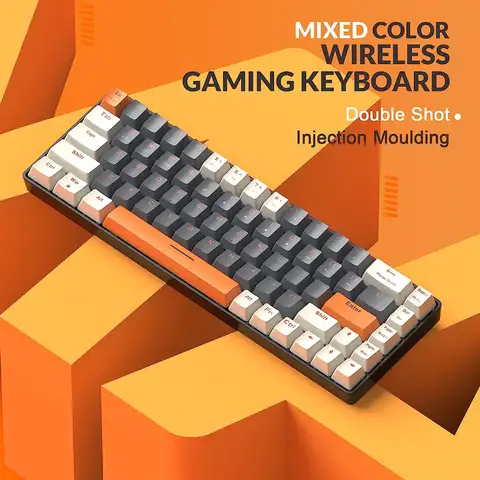
Results for desktop keyboard

Looking for a high-performance desktop keyboard that combines ergonomic design, mechanical precision, and customizable features? You're in the right place. Whether you're building a productivity-focused workstation, enhancing your home office setup, or seeking a durable replacement for your current keyboard, the right desktop keyboard can significantly improve typing comfort, efficiency, and long-term wrist health.
The term desktop keyboard refers to a full-sized or compact input device designed specifically for use on a desk or workstation, typically connected via USB or Bluetooth. Unlike laptop keyboards, desktop models offer greater customization, better key feel, and often support advanced features like hot-swappable switches, RGB lighting, and programmable keys. These keyboards are ideal for users who prioritize typing accuracy, customization, and ergonomic comfort during extended work sessions.
Ergonomic Keyboard
A keyboard designed to reduce strain on the hands, wrists, and arms by promoting a natural hand position. Split layouts and contoured designs help prevent repetitive strain injuries (RSIs).
Hot-Swap Switch Support
Allows users to replace mechanical switches without soldering, enabling quick customization of key feel (e.g., tactile, linear, clicky).
OLED/VIAL Customization
OLED displays on keyboards provide real-time feedback (e.g., battery level, volume), while VIAL software enables deep customization of key mappings and macros.

When choosing a desktop keyboard, consider the following:
  1. Assess Your Workspace Needs – If you have limited desk space, a compact split keyboard (like the 39/44/61 key models) with a trackball can save space and reduce hand movement.
  2. Check Compatibility – Ensure the keyboard matches your device. For example, the RTDPART replacement keyboard is specifically designed for the TCL Book 14 Go B220G, ensuring a perfect fit.
  3. Choose the Right Switch Type – Mechanical keyboards with PBT keycaps (like the DYE FETISH 125-key set) offer superior durability and a satisfying tactile feel. PBT material resists shine and wear over time.
  4. Look for Ergonomic Features – Split designs, wrist rests, and trackballs (e.g., Keyball series) help maintain neutral hand posture, reducing long-term fatigue.
  5. Verify Connectivity and PowerWired keyboards (USB) offer zero latency and no battery concerns. For wireless use, ensure Bluetooth support and a stable connection.

Top recommendations include the Keyball 39/44/61 Wired Split Keyboard Kit with hot-swap switches and OLED display—ideal for power users. For users needing a direct replacement, the RTDPART Keyboard for TCL Book 14 Go B220G ensures seamless integration. Meanwhile, the DYE FETISH Cherry Profile PBT Keycaps offer a premium upgrade for any mechanical desktop keyboard.
Investing in a quality desktop keyboard isn’t just about typing—it’s about creating a sustainable, efficient, and comfortable workflow.

Ergonomic Split Desktop Keyboard -AliExpress

Find the Perfect Desktop Keyboard for Enhanced Productivity and Comfort


When searching for a desktop keyboard, users are typically looking for a reliable, ergonomic, and feature-rich input device that enhances typing comfort, improves workflow efficiency, and integrates seamlessly with their desktop setup. Whether you're a remote worker, content creator, programmer, or casual user, the right desktop keyboard can significantly impact your daily productivity and long-term wrist health. The ideal choice balances performance, customization, and durability—offering features like mechanical switches, split design, hot-swap support, RGB lighting, and compatibility with various devices.

Understanding the Search Intent Behind Desktop Keyboard


The term desktop keyboard reflects a clear intent: users want a full-sized or compact keyboard designed specifically for use on a desktop computer. This includes considerations such as:
- Ergonomics: Reducing strain during long typing sessions.
- Connectivity: Wired (USB) or wireless (Bluetooth) options.
- Customization: Keycap swaps, RGB lighting, programmable keys.
- Durability: High-quality materials and switch longevity.
- Compatibility: Support for Windows, macOS, Linux, and specific laptop models.
These needs are best met by modern mechanical and split keyboards that prioritize user comfort and functionality.
Desktop Keyboard
A full-sized or compact keyboard designed for use with desktop computers, typically connected via USB or Bluetooth, offering enhanced typing experience and ergonomic design.
Mechanical Switch
A type of keyboard switch that uses a physical mechanism to register keystrokes, offering tactile feedback, longer lifespan, and customizable actuation force.
Split Keyboard
A keyboard design that divides the key layout into two separate halves, promoting a more natural hand position and reducing wrist strain.
Hot-Swap Switch
A feature allowing users to replace keyboard switches without soldering, enabling easy customization of typing feel and sound.
OLED/VIAL Support
Integration with OLED displays and the VIAL firmware platform, enabling advanced customization, macro programming, and dynamic key mapping.

Choosing the Right Desktop Keyboard: A Step-by-Step Guide


To find the best desktop keyboard for your needs, follow this practical approach:
  1. Identify Your Primary Use Case: Are you coding, writing, gaming, or managing office tasks? This determines whether you need a full-size, compact, or split keyboard.
  2. Evaluate Ergonomics and Design: Look for split, ergonomic, or tented layouts to reduce wrist strain during extended use.
  3. Check Switch Type and Feel: Choose between tactile, linear, or clicky switches based on your typing preference and noise tolerance.
  4. Assess Customization Options: Consider models with hot-swap switches, programmable keys, and support for keycap swaps and firmware (e.g., VIAL).
  5. Verify Compatibility: Ensure the keyboard works with your operating system and any specific devices (e.g., laptops, tablets).
  6. Review Build Quality and Features: Prioritize durable materials, USB connectivity, and additional features like trackballs or RGB lighting.

Real-World Scenario: Upgrading a Home Office Setup


Problem: A freelance writer using a TCL Book 14 Go B220G laptop for daily work experiences wrist discomfort due to a cramped, non-ergonomic keyboard. They want a desktop keyboard that improves typing comfort and integrates with their existing setup.
Solution: Upgrade to a dedicated desktop keyboard with ergonomic design and compatibility with their laptop.
Step-by-Step Answer:
1. Select a Compatible Replacement Keyboard: Choose a keyboard designed for laptops like the TCL Book 14 Go B220G, ensuring correct layout and key mapping.
2. Prioritize Ergonomics: Opt for a split or tented design to reduce wrist strain during long writing sessions.
3. Ensure Wired Connectivity: Use a USB-wired keyboard for stable, low-latency performance.
4. Add a Trackball for Efficiency: Include a trackball for easier cursor control without a mouse.
5. Customize for Comfort: Swap in PBT keycaps for durability and tactile feedback.

Comparison of Top Desktop Keyboard Options


Feature Keyball 39/44/61 Split Keyboard TCL Book 14 Go B220G Replacement Keyboard DYE FETISH PBT Keycaps
Type Wired Split Keyboard with Trackball Replacement Keyboard (Laptop-Specific) Keycap Set (PBT, Cherry Profile)
Connectivity USB Wired USB Wired None (Replacement Part)
Switch Type Hot-Swap Mechanical Membrane (Non-Mechanical) Compatible with MX Switches
Ergonomics Split, Tented, Trackball Standard Layout, Non-Ergonomic Enhances Typing Feel
Customization RGB, OLED, VIAL Firmware Fixed Layout 125 Keys, Dye-Sublimated
Use Case Home Office, Programming, Long Typing Laptop Replacement Keyboard Upgrade & Personalization

Pro Tips for Maximizing Your Desktop Keyboard Experience


- Use PBT Keycaps for long-term durability and a premium feel—resistant to shine and wear.
- Enable Hot-Swap Switches to experiment with different switch types (e.g., Gateron, Cherry MX) without tools.
- Tilt Your Keyboard using a riser or built-in tenting to achieve a natural hand angle.
- Pair with a Trackball to reduce mouse fatigue—ideal for writers and designers.
- Update Firmware (e.g., via VIAL) for advanced macro and layer customization.

Final Recommendation


For users seeking a high-performance, customizable, and ergonomic desktop keyboard, the Keyball 39/44/61 Wired Split Keyboard Kit stands out as the top choice. It combines a split design, hot-swap switches, OLED display, and trackball support—perfect for long typing sessions. Pair it with DYE FETISH PBT keycaps for a premium feel and durability. If you're replacing a laptop keyboard, the RTDPART For TCL Book 14 Go B220G model ensures seamless compatibility. Ultimately, investing in a quality desktop keyboard not only boosts productivity but also protects your long-term health.

Aliexpress